
Arrays: Memory Layout & Applications
Understanding the Fundamental Data Structure in Computing

Arrays are one of the most fundamental data structures in computer science. Nearly every complex data structure — such as matrices, heaps, hash tables, and graphs — builds upon arrays.
An array stores multiple elements of the same type in contiguous memory locations, allowing efficient access and manipulation of data.
Because of their simplicity and efficiency, arrays are widely used in:
- Operating systems
- Databases
- Graphics processing
- Scientific computing
- Machine learning
- Competitive programming
This article explores the memory layout of arrays, how indexing works, and their practical applications.
What is an Array?
An array is a collection of elements stored in continuous memory locations.
Each element can be accessed using an index.
Example
Array A = [10, 20, 30, 40, 50]| Index | Value |
|---|---|
| 0 | 10 |
| 1 | 20 |
| 2 | 30 |
| 3 | 40 |
| 4 | 50 |
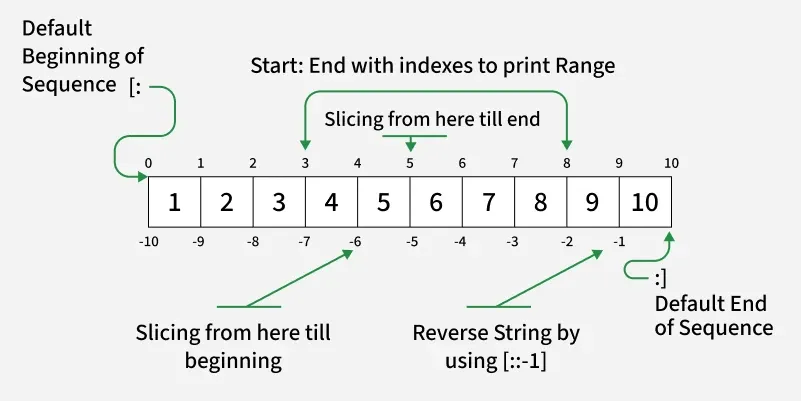
Most programming languages use zero-based indexing.
Python Example
# creating an array (Python list)
A = [10, 20, 30, 40, 50]

# accessing elements
print(A[0])   # Output: 10
print(A[2])   # Output: 30
print(A[4])   # Output: 50
Accessing any element takes O(1) time.
Memory Layout of Arrays
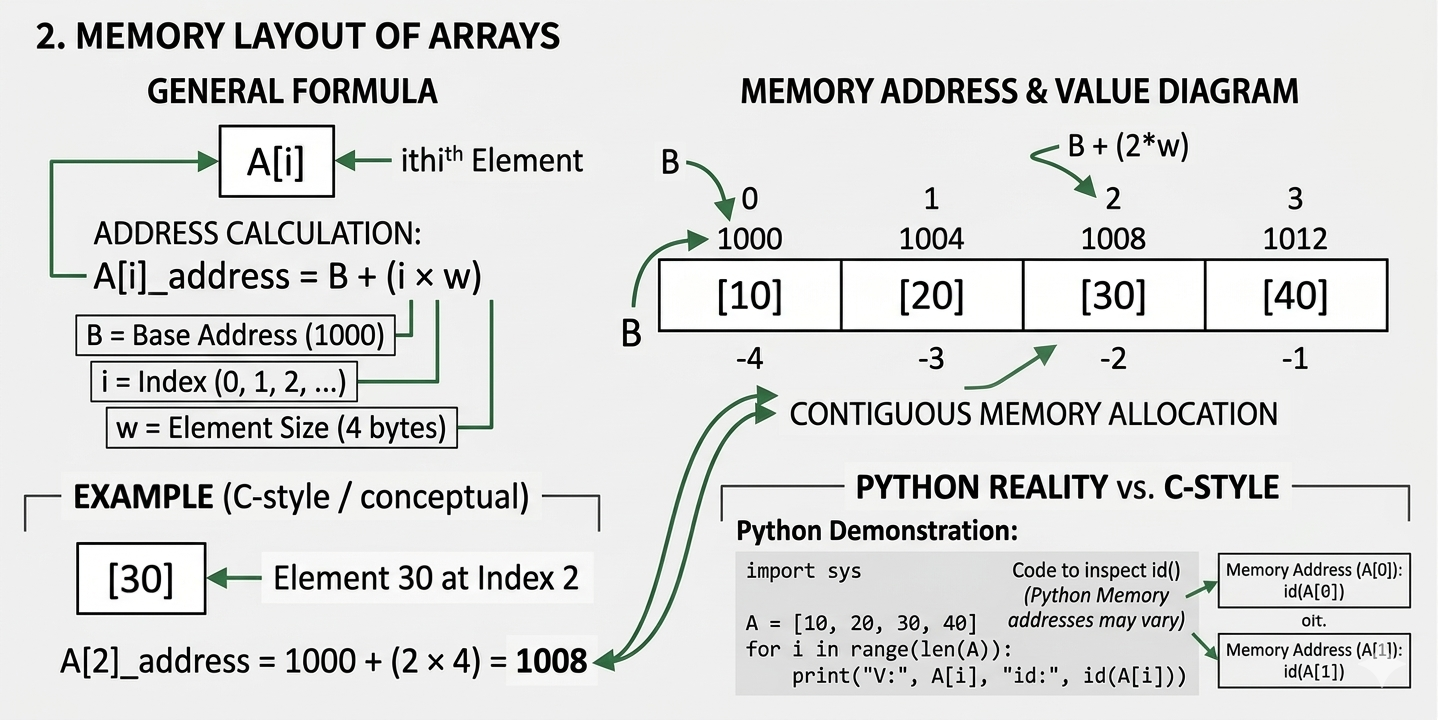
The defining property of arrays is contiguous memory allocation.
If the base address of the array is B and the size of each element is w bytes, then the address of the ith element is calculated using:
Where:
- B = base address
- i = index
- w = size of each element
Example
Suppose:
- Base address = 1000
- Element size = 4 bytes
A = [10, 20, 30, 40]Memory layout:
| Index | Value | Address |
|---|---|---|
| 0 | 10 | 1000 |
| 1 | 20 | 1004 |
| 2 | 30 | 1008 |
| 3 | 40 | 1012 |
Python Demonstration (Memory Address)
Python does not guarantee strict contiguous storage like C arrays, but we can still inspect memory addresses.
import sys

A = [10, 20, 30, 40]

for i in range(len(A)):
    print("Value:", A[i], "Address:", id(A[i]))
This prints the memory location of each element.
Types of Arrays
Arrays can be categorized based on dimensions.
One-Dimensional Array
A simple linear list of elements.
Example:
[5, 9, 3, 7]Memory structure:
|5|9|3|7|Python Example
arr = [5, 9, 3, 7]

# printing elements
for element in arr:
    print(element)
Applications include:
- Storing lists
- Buffers
- Temporary data storage
Two-Dimensional Array
A matrix-like structure with rows and columns.
Example:
A = [
 [1,2,3],
 [4,5,6],
 [7,8,9]
]
Python Example
matrix = [
    [1,2,3],
    [4,5,6],
    [7,8,9]
]

print(matrix[0][1])  # Output: 2
print(matrix[2][2])  # Output: 9
Used in:
- Image processing
- Game boards
- Mathematical matrices
Row-Major Order
Elements stored row by row.
Memory layout:
1 2 3 4 5 6 7 8 9Address formula:
Where n = number of columns.
Python Row Traversal Example
matrix = [
    [1,2,3],
    [4,5,6],
    [7,8,9]
]

for row in matrix:
    for element in row:
        print(element, end=" ")
Column-Major Order
Elements stored column by column. Used in languages like Fortran and MATLAB.
Address formula:
Where m = number of rows.
Python Column Traversal Example
matrix = [
    [1,2,3],
    [4,5,6],
    [7,8,9]
]

rows = len(matrix)
cols = len(matrix[0])

for j in range(cols):
    for i in range(rows):
        print(matrix[i][j], end=" ")
Basic Array Operations
Arrays support several important operations.
Access
Retrieving an element using its index.
A[3]Python Example
A = [10,20,30,40]

print(A[3])  # Output: 40
Time complexity: O(1)
Traversal
Visiting each element in sequence.
A = [10,20,30,40]

for x in A:
    print(x)
Time complexity: O(n)
Insertion
Inserting into the middle requires shifting elements.
Example:
- Before:
[10,20,30,40] - Insert 25 at index 2
- After:
[10,20,25,30,40]
Python Example
A = [10,20,30,40]

A.insert(2,25)

print(A)
Time complexity: O(n)
Deletion
Removing an element also requires shifting.
Example:
- Before:
[10,20,30,40] - Delete index 1
- After:
[10,30,40]
Python Example
A = [10,20,30,40]

del A[1]

print(A)
Time complexity: O(n)
Static vs Dynamic Arrays
Static Arrays
Fixed size allocated at compile time.
Example in C:
int A[10];Python Note
Python does not have static arrays by default, but the array module can simulate them.
import array

A = array.array('i', [1,2,3,4])
print(A)
Dynamic Arrays
Resizable arrays allocated during runtime.
Examples:
- Python lists
- C++ vectors
- Java ArrayList
Python Example
A = [1,2,3]

A.append(4)
A.append(5)

print(A)
Dynamic arrays automatically resize when capacity is exceeded.
Dynamic Array Resizing
When capacity is full:
- Allocate larger array
- Copy elements
- Insert new element
This copying costs O(n), but the amortized cost of insertion remains O(1) because resizing happens rarely.
Python internally resizes the list automatically using a growth factor, keeping amortized append cost at O(1).
A = []

for i in range(10):
    A.append(i)

print(A)
Advantages of Arrays
Fast Access
Direct index access gives O(1) time.
Memory Efficiency
Contiguous memory improves cache performance.
Simplicity
Arrays are easy to implement and understand.
Limitations of Arrays
Fixed Size (Static Arrays)
Cannot grow automatically.
Costly Insertions and Deletions
Shifting elements causes O(n) time complexity.
Homogeneous Elements
All elements must be of the same data type in low-level languages.
Applications of Arrays
Arrays appear in numerous real-world systems.
Matrix Computations
Scientific computing relies heavily on arrays.
- Linear algebra
- Physics simulations
import numpy as np

matrix = np.array([[1,2],[3,4]])

print(matrix)
Image Processing
Images are stored as 2D arrays of pixels.
import numpy as np

image = np.zeros((5,5))

print(image)
Database Systems
Indexes and buffers often use arrays.
Sorting Algorithms
Many sorting algorithms operate directly on arrays.
- Merge sort
- Quick sort
- Heap sort
A = [5,3,8,1]

A.sort()

print(A)
Graph Algorithms
Graphs may be represented using adjacency matrices, which are arrays.
graph = [
    [0,1,0],
    [1,0,1],
    [0,1,0]
]

print(graph[0][1])  # edge between node 0 and 1
Arrays in Modern Programming Languages
Most programming languages implement arrays differently.
| Language | Implementation |
|---|---|
| C | Fixed-size arrays |
| C++ | Arrays & vectors |
| Java | Array objects |
| Python | Dynamic lists |
| JavaScript | Dynamic arrays |
Despite differences, the core concept remains the same.
Time Complexity Summary
| Operation | Time Complexity |
|---|---|
| Access | O(1) |
| Search | O(n) |
| Insertion | O(n) |
| Deletion | O(n) |
| Traversal | O(n) |
Why Arrays Are So Important
Arrays are foundational because they:
- Provide fast random access
- Enable efficient memory usage
- Serve as the building blocks for complex data structures
Many advanced structures depend on arrays, including:
- Heaps
- Hash tables
- Dynamic programming tables
- Graph adjacency matrices
Understanding arrays deeply is essential for mastering data structures and algorithm design.
Common Array Methods in Python
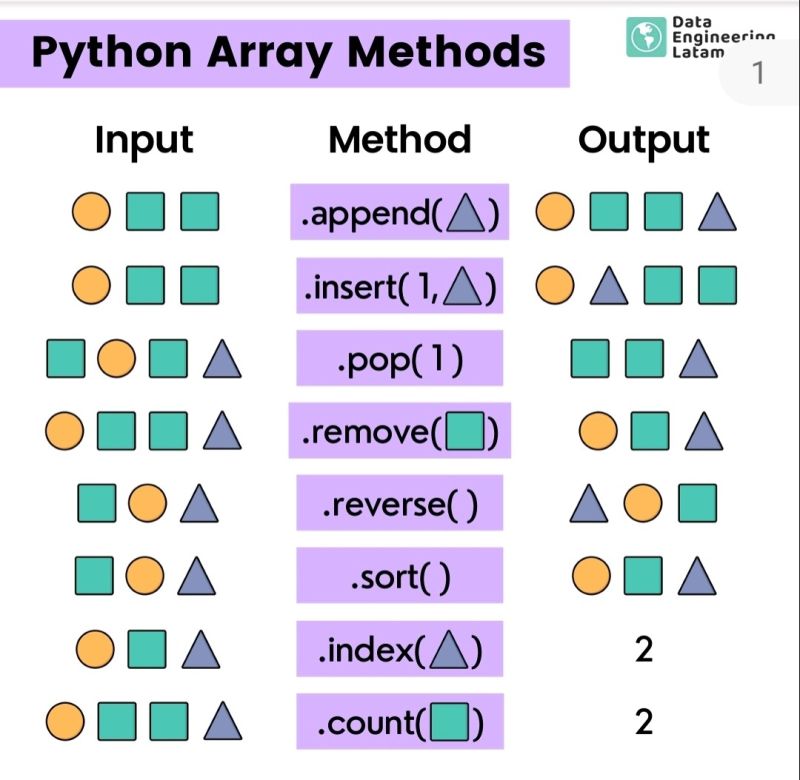
In Python, arrays are commonly implemented using lists, which provide many built-in methods to manipulate data efficiently.
append()
The append() method adds an element to the end of the array.
Syntax
array.append(element)Example
A = [10, 20, 30]

A.append(40)

print(A)
Output: [10, 20, 30, 40]
Time Complexity: O(1) (amortized)
insert()
The insert() method adds an element at a specific index.
Syntax
array.insert(index, element)Example
A = [10, 20, 30, 40]

A.insert(2, 25)

print(A)
Output: [10, 20, 25, 30, 40]
Time Complexity: O(n) — because elements need to shift.
remove()
The remove() method deletes the first occurrence of a value.
Syntax
array.remove(value)Example
A = [10, 20, 30, 20]

A.remove(20)

print(A)
Output: [10, 30, 20]
pop()
The pop() method removes and returns an element. If no index is given, it removes the last element.
Syntax
array.pop(index)Example
A = [10, 20, 30, 40]

A.pop()

print(A)
Output: [10, 20, 30]
Example with index
A = [10, 20, 30, 40]

A.pop(1)

print(A)
Output: [10, 30, 40]
index()
The index() method returns the index of a value.
Syntax
array.index(value)Example
A = [10, 20, 30, 40]

print(A.index(30))
Output: 2
count()
The count() method counts how many times an element appears.
Syntax
array.count(value)Example
A = [10, 20, 20, 30]

print(A.count(20))
Output: 2
sort()
The sort() method sorts the array in ascending order.
Syntax
array.sort()Example
A = [5, 2, 8, 1]

A.sort()

print(A)
Output: [1, 2, 5, 8]
Descending order:
A.sort(reverse=True)reverse()
The reverse() method reverses the order of elements.
Syntax
array.reverse()Example
A = [1, 2, 3, 4]

A.reverse()

print(A)
Output: [4, 3, 2, 1]
extend()
The extend() method adds elements from another array.
Syntax
array.extend(other_array)Example
A = [1, 2, 3]
B = [4, 5, 6]

A.extend(B)

print(A)
Output: [1, 2, 3, 4, 5, 6]
clear()
The clear() method removes all elements from the array.
Syntax
array.clear()Example
A = [10, 20, 30]

A.clear()

print(A)
Output: []
Conclusion
Arrays are one of the most essential data structures in computer science. Their contiguous memory layout enables constant-time access and efficient computation.
Although arrays have limitations such as costly insertions and fixed sizes in some languages, they remain a cornerstone of algorithm design and system implementation.
Mastering arrays and their memory structure is the first step toward understanding more advanced data structures.