
Strings: Internal Representation — How Text Is Stored in Memory
DSA Series · Phase 2: Core Data Structures · Article 15 — ASCII, Unicode, UTF-8, immutability and the cost of string operations
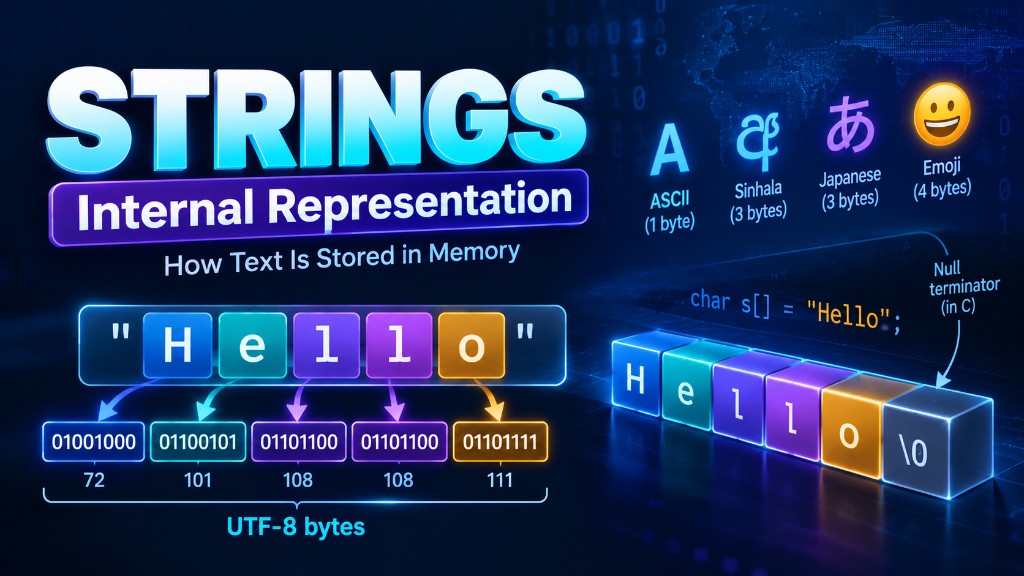
Difficulty: Beginner to Intermediate · Topics: Strings, Memory Representation, ASCII, Unicode, UTF-8, Immutability, String Operations, Time Complexity
1. Introduction
Think about how many times you interact with text in a single day.
You send messages, search for information, enter passwords, write code, and browse websites. Behind almost every one of these operations is a fundamental data structure: the string.
Consider this simple Python statement:
message = "Hello World"It looks straightforward. We create a variable and assign some text to it. But have you ever wondered what actually happens inside the computer?
How does the computer store letters when memory fundamentally stores binary data? Why can we access individual characters using indices? Why is modifying a string different from modifying an array? And why do some characters require more memory than others?
To answer these questions, we need to understand the internal representation of strings.
In the previous article, we explored dynamic arrays and how they manage memory as elements are inserted or removed. Strings share some similarities with arrays, but they introduce additional challenges involving character encoding, immutability, and memory management.
In this article, we will explore how strings work internally, examine different character encoding systems, understand their memory behavior, and analyze the efficiency of common string operations.
2. What Is a String?
A string is a sequence of characters used to represent text. For example:
name = "Alice"This string contains five characters:
Index:       0     1     2     3     4
           +-----+-----+-----+-----+-----+
Character: |  A  |  l  |  i  |  c  |  e  |
           +-----+-----+-----+-----+-----+
Each character has a logical position called an index. In most modern programming languages, indexing begins at zero. Therefore:
name[0]  # 'A'
name[2]  # 'i'
name[4]  # 'e'
At a high level, a string behaves like an array of characters. However, the actual representation depends on the programming language and its implementation. For example:
- C commonly represents strings using null-terminated character arrays.
- C++ provides
std::string, which manages its own storage. - Java represents strings using immutable
Stringobjects. - Python uses immutable Unicode string objects.
Although these implementations differ, they all need to solve the same fundamental problem:
How can a sequence of human-readable characters be represented efficiently in computer memory?
3. How Computers Store Characters
Computers do not directly understand letters such as A, B, or C. At the hardware level, memory stores bits. A bit can represent one of two values:
Eight bits form one byte. For example:
01000001This binary pattern can represent the character A under the ASCII encoding system. To convert text into data that computers can store, we use character encoding.
What Is Character Encoding?
Character encoding defines how text is represented using sequences of bytes. For example, in ASCII:
| Character | Decimal Value | Binary |
|---|---|---|
| A | 65 | 01000001 |
| B | 66 | 01000010 |
| C | 67 | 01000011 |
| a | 97 | 01100001 |
| 0 | 48 | 00110000 |
| Space | 32 | 00100000 |
Consider the string:
text = "CAT"Its ASCII representation is:
Character:     C          A          T

Decimal:      67         65         84

Binary:    01000011   01000001   01010100
The string requires three bytes when stored using ASCII, excluding any additional metadata or terminators. This conversion between characters and bytes is essential for file storage, network communication, and text processing.
4. ASCII, Unicode, and UTF-8
ASCII was one of the earliest widely adopted character encoding standards. However, it has an important limitation: ASCII defines only 128 character values. These include English letters, digits, punctuation, and control characters.
What happens when we need to represent text in other languages?
Hello
ආයුබෝවන්
こんにちは
你好
ASCII cannot represent all these characters. This is why Unicode is important.
Unicode
Unicode is a standard that assigns unique code points to characters from writing systems around the world.
| Character | Unicode Code Point |
|---|---|
| A | U+0041 |
| € | U+20AC |
| අ | U+0D85 |
| 😀 | U+1F600 |
A Unicode code point is an identifier for a character or another text element defined by the Unicode standard. However, Unicode code points are not themselves a specific byte-storage format. To store Unicode text as bytes, we need an encoding such as UTF-8, UTF-16, or UTF-32.
UTF-8
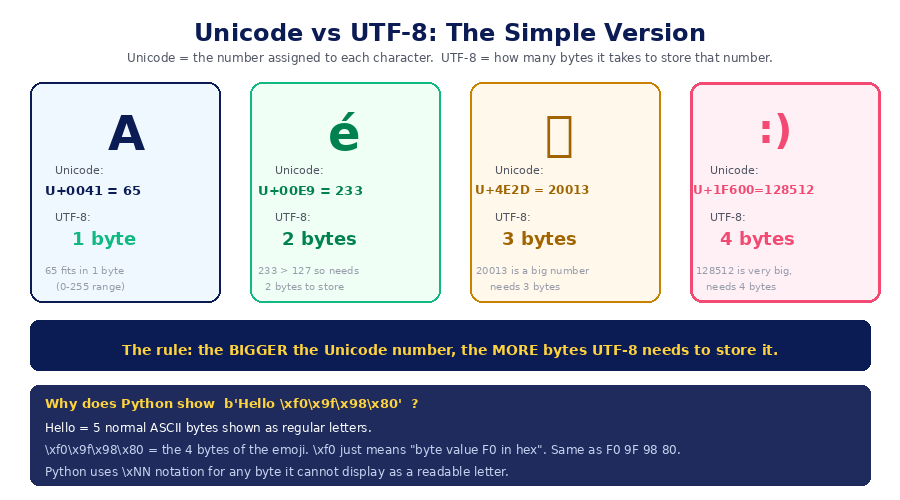
UTF-8 is one of the most widely used text encodings. It represents Unicode code points using between one and four bytes.
| Code Point Range | UTF-8 Bytes |
|---|---|
| U+0000–U+007F | 1 |
| U+0080–U+07FF | 2 |
| U+0800–U+FFFF | 3 |
| U+10000–U+10FFFF | 4 |
For example:
print(len("A".encode("utf-8")))   # 1
print(len("€".encode("utf-8")))   # 3
print(len("අ".encode("utf-8")))   # 3
print(len("😀".encode("utf-8")))  # 4
This shows that different characters can require different numbers of bytes.
Why Is UTF-8 Popular?
- It supports Unicode text from many languages.
- ASCII characters use the same single-byte values as ASCII.
- It avoids wasting multiple bytes for common ASCII text.
- It is widely supported by operating systems, databases, and web technologies.
However, variable-length encoding introduces an important challenge: finding the byte position of the nth Unicode character is not always a simple constant-time operation in a UTF-8 byte sequence.
5. How Strings Are Represented in Memory
Different programming languages use different internal string representations. Let's explore three common approaches.
5.1 Null-Terminated Strings in C
In C, a string is commonly represented using an array of characters ending with a null character, '\0'. Consider:
char name[] = "CAT";The actual memory representation is:
Index:       0       1       2       3
           +-------+-------+-------+-------+
Value:     |  'C'  |  'A'  |  'T'  | '\0'  |
+-------+-------+-------+-------+![C string char str[] = "HELLO" stored as H, E, L, L, O followed by the null terminator \0 marking the end of the string](images/strings-null-terminated.png)
The null terminator indicates where the string ends. Although "CAT" contains three visible characters, the array requires four bytes in a typical ASCII-compatible C environment. This is why:
sizeof(name)returns 4. The null terminator is essential for many C string functions. For example:
strlen(name);must scan the characters until it encounters '\0'. Therefore, calculating the length of a null-terminated string generally requires:
5.2 Length-Prefixed Strings
Another approach stores the string length as metadata. Conceptually:
Length = 5

+--------+-------------------------+
| Length | H | E | L | L | O       |
+--------+-------------------------+
Because the length is already stored, retrieving it can take constant time:
Many modern string implementations maintain length information, although their exact memory layouts differ.
5.3 Immutable String Objects
Languages such as Python and Java expose strings as immutable objects. This means the string's contents cannot be modified after creation. Consider:
text = "Hello"
text[0] = "Y"
Python raises:
TypeError: 'str' object does not support item assignmentThis happens because Python strings are immutable. To produce "Yello", we need to create another string:
text = "Y" + text[1:]The variable now refers to the newly created string. This difference between mutable and immutable data structures has important implications for memory management and performance.
6. Strings vs Character Arrays
Although strings and character arrays are closely related, they are not always interchangeable. A character array is a sequence of character storage locations. A string is a higher-level abstraction that represents text and may include additional information or behavior.
Consider a C character array:
char letters[] = {'H', 'E', 'L', 'L', 'O'};This array does not contain a null terminator. Therefore, it is not a valid null-terminated C string. Now consider:
char word[] = "HELLO";This includes the terminating '\0'.
Comparison
| Feature | Character Array | String Object |
|---|---|---|
| Storage | Sequence of elements | Implementation-dependent |
| Length | May need tracking | Often stored |
| Mutability | Usually mutable | Language-dependent |
| Encoding | Depends on element type | Language-dependent |
| Memory management | May be manual | Often automatic |
| Built-in operations | Usually limited | Often extensive |
Understanding this distinction helps prevent mistakes when working with low-level memory and high-level text-processing APIs.
7. How Python Strings Work Internally
Python strings are more sophisticated than simple arrays of characters. In CPython, Unicode strings use a flexible internal representation defined by PEP 393. This representation allows strings to use different storage widths depending on the Unicode code points they contain. Conceptually, CPython can use:
- One byte per code point
- Two bytes per code point
- Four bytes per code point
This is different from saying that Python stores every string using UTF-8. For example:
text1 = "Hello"
text2 = "ආයුබෝවන්"
text3 = "😀"
These strings may use different internal element widths. The precise memory consumption also includes object metadata and depends on the Python implementation.
String Length in Python
text = "Hello"
print(len(text))
Output:
5In CPython, the string object maintains its length, so retrieving it is O(1).
However, an important distinction exists between code points, bytes, and user-perceived characters. For example:
text = "e\u0301"

print(len(text))                 # 2
print(len(text.encode("utf-8"))) # 3
Although the text may visually appear as a single accented character, it contains two Unicode code points. This means the number of visible characters is not always equal to the number of Unicode code points or bytes.
8. String Immutability and Its Consequences
String immutability is one of the most important concepts to understand. Consider:
name = "Hello"
name = name + " World"
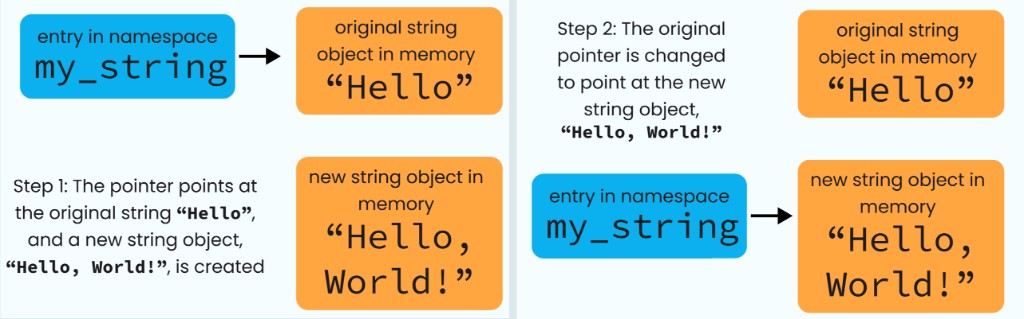
At first glance, it appears that the original string is extended. But conceptually, a new string is created.
Original:
"Hello"

Concatenation:
"Hello" + " World"

Result:
"Hello World"
The original string is not modified in place — the variable is simply re-pointed at the new object:
Why Are Strings Immutable?
1. Safer sharing — Multiple parts of a program can reference the same string without worrying that another part will modify it.
2. Hashability — Immutable strings can be used as dictionary keys and set elements.
student = {
    "name": "Alice",
    "age": 22
}
3. Simpler reasoning — A string's contents remain unchanged throughout its lifetime.
4. Optimization opportunities — Implementations can safely reuse or cache certain string-related information.
The Performance Trade-Off
Immutability also introduces overhead. If we repeatedly concatenate strings, new string objects may need to be created. Consider:
result = ""

for i in range(10000):
    result += "a"
Repeated concatenation can involve substantial copying. Depending on the implementation and optimization opportunities, the total cost may approach O(n²).
For predictable and efficient construction of large strings in Python, a common approach is to collect pieces and join them:
parts = []

for i in range(10000):
    parts.append("a")

result = "".join(parts)
This approach avoids repeatedly copying an increasingly large accumulated result.
Building a string piece by piece with += can copy the growing result again and again. Collecting fragments in a list (a dynamic array) and calling "".join() once keeps the total work linear.
9. Time Complexity of Common String Operations
For this discussion, assume an immutable string implementation with constant-time indexed access to stored code points.
| Operation | Time Complexity |
|---|---|
| Access character by index | O(1) |
| Get stored length | O(1) |
| Traverse string | O(n) |
| Compare two strings | O(n) worst case |
| Search for a character | O(n) worst case |
| Copy string | O(n) |
| Concatenate two strings | O(n + m) |
| Create a substring copy | O(k) |
| Reverse string | O(n) |
Here:
- n is the length of the first string.
- m is the length of the second string.
- k is the length of the substring.
These are useful general models, but exact complexities can vary between languages, encodings, and string APIs.
Why Is String Comparison O(n)?
a = "algorithm"
b = "algorithms"
To compare two strings, the program may need to inspect multiple characters. In the worst case, it must compare nearly all characters before identifying a difference. Therefore:
Why Is String Concatenation O(n + m)?
a = "Data"
b = "Structures"

result = a + b
An immutable string implementation generally needs to allocate enough storage for the result and copy the contents of both strings. Therefore:
10. String Operations in Python
Accessing Characters
text = "ALGORITHM"

print(text[0])   # A
print(text[4])   # R
print(text[-1])  # M
Accessing a code point by index takes O(1) in CPython.
Slicing Strings
text = "ALGORITHM"

print(text[0:4])  # ALGO
print(text[4:])   # RITHM
A nontrivial slice generally creates a new string. If the slice contains k code points, its time complexity is O(k).
Searching
text = "DATA STRUCTURES"

print("STRUCTURES" in text)
Output:
TrueSubstring search complexity depends on the search algorithm and implementation. A straightforward naive algorithm can require O(nm) time in the worst case, where n is the text length and m is the pattern length. More advanced string-search algorithms can improve this bound.
Reversing
text = "HELLO"

reversed_text = text[::-1]

print(reversed_text)
Output:
OLLEHThis takes O(n) time and uses O(n) space for the resulting string.
11. String Encoding and Decoding
Encoding converts text into bytes. Decoding converts bytes back into text.
Encoding
text = "Hello"

encoded = text.encode("utf-8")

print(encoded)
Output:
b'Hello'Decoding
encoded = b"Hello"

decoded = encoded.decode("utf-8")

print(decoded)
Output:
HelloConceptually:
Unicode String
      |
      | Encode (UTF-8)
      v
Sequence of Bytes
      |
      | Decode (UTF-8)
      v
Unicode String
This distinction becomes important when handling files, HTTP requests, databases, and communication between different systems.
A Common Encoding Problem
Suppose text is encoded using UTF-8 but decoded using an incompatible character encoding. The resulting characters may appear corrupted. This is commonly called mojibake.
For reliable text processing, systems must agree on the encoding used to represent data.
12. Strings and Memory Efficiency
Memory consumption depends on several factors:
- Number of code points
- Encoding or internal storage width
- Object metadata
- Memory alignment
- Implementation-specific optimizations
Consider:
import sys

a = "Hello"
b = "ආයුබෝවන්"
c = "😀"

print(sys.getsizeof(a))
print(sys.getsizeof(b))
print(sys.getsizeof(c))
The reported sizes can differ. However, sys.getsizeof() measures the memory attributed to the object by the interpreter, not just the bytes needed to encode its visible text. It should not be confused with:
len(text.encode("utf-8"))which measures the number of bytes in the UTF-8 representation.
Why Does This Matter?
Imagine processing millions of strings in a search engine or large-scale data-processing system. Even small differences in memory consumption can significantly affect:
- RAM usage
- Cache efficiency
- Storage requirements
- Network bandwidth
- Processing performance
Choosing an appropriate text representation can therefore influence the performance of an entire system.
13. Real-World Applications of Strings
1. Search Engines
Search engines process queries, tokenize documents, compare terms, and identify matching patterns. Efficient string-processing algorithms help handle enormous volumes of text.
2. Web Applications
Web applications use strings for usernames, URLs, form inputs, API requests, and responses. Correct encoding ensures that text from different languages is processed consistently.
3. Natural Language Processing
NLP systems process human language for tasks such as sentiment analysis, translation, summarization, and speech recognition. Unicode handling is especially important when working with multilingual datasets.
4. Cybersecurity
Strings appear in passwords, authentication tokens, URLs, and network protocols. Incorrect handling of string boundaries, encodings, or lengths can introduce security vulnerabilities.
5. Compilers and Interpreters
Compilers process source code as sequences of characters. Lexical analysis identifies keywords, operators, identifiers, and other tokens. Understanding string representation helps explain how programming languages parse source code.
14. Common Mistakes When Working with Strings
Mistake 1: Assuming One Character Equals One Byte
This is not true for Unicode text encoded in UTF-8. For example:
text = "අ"

print(len(text))                 # 1
print(len(text.encode("utf-8"))) # 3
Mistake 2: Confusing Bytes with Characters
Byte length and code-point length are different measurements. This distinction is especially important in multilingual applications.
Mistake 3: Ignoring String Immutability
Repeatedly building large strings through concatenation can cause unnecessary allocations and copying. Use appropriate builders or joining techniques when needed.
Mistake 4: Assuming All String Indexing Works the Same Way
In some representations, accessing the nth logical character may require scanning variable-length encoded data.
Mistake 5: Ignoring Unicode Normalization
Two strings may look identical but contain different sequences of Unicode code points. For example:
a = "\u00E9"
b = "e\u0301"

print(a == b)  # False
Unicode normalization can help standardize these representations:
import unicodedata

print(
    unicodedata.normalize("NFC", a)
    ==
    unicodedata.normalize("NFC", b)
)
Output:
TrueThis matters in text search, data validation, and multilingual applications.
15. Interview Questions
Q1. What is a string?
A string is a sequence of characters used to represent text.
Q2. How are strings stored in memory?
Strings are stored using implementation-specific representations that may include character data, length information, encoding details, and object metadata.
Q3. What is the difference between ASCII and Unicode?
ASCII defines a limited set of character values, while Unicode provides code points for characters and text elements across many writing systems.
Q4. Why are strings immutable in Python?
Immutability makes strings safe to share, supports hashability, and allows implementation optimizations.
Q5. Why can repeated string concatenation be inefficient?
It may repeatedly allocate new storage and copy previously accumulated content.
Q6. What is the difference between UTF-8 and UTF-16?
Both encode Unicode text, but UTF-8 uses one to four bytes per code point, while UTF-16 uses one or two 16-bit code units.
Q7. What is a null-terminated string?
It is a sequence of characters terminated by a null character, commonly used in C.
Q8. Does len() always return the number of visible characters?
No. In Python, len() returns the number of Unicode code points, which may differ from the number of user-perceived characters.
16. Practice Problems
Try solving these problems to strengthen your understanding.
Problem 1 — Reverse a String (Easy)
Write a function that reverses a string.
def reverse_string(text):
    pass
Input: "hello"
Output: "olleh"Problem 2 — Check Palindrome (Easy)
Determine whether a string reads the same forward and backward.
def is_palindrome(text):
    pass
Input: "level"
Output: TrueProblem 3 — Count Character Frequencies (Easy)
Count how many times each character appears.
def char_frequency(text):
    pass
Input: "banana"
Output:
b: 1
a: 3
n: 2Problem 4 — Compare Encodings (Medium)
Write a program that compares the byte lengths of several strings encoded using UTF-8, UTF-16, and UTF-32. Use text from different writing systems and explain the differences.
Problem 5 — Implement a Simple String Builder (Advanced)
Create a class that efficiently builds a string from multiple fragments. Use a dynamic array to store the fragments and join them when the final string is requested. Compare its performance against repeated string concatenation.
17. Key Takeaways
Strings may appear simple, but their internal representation involves several important computer science concepts.
- Strings represent sequences of characters. Their actual memory layout depends on the language and implementation.
- Computers store bytes, not letters directly. Character encoding connects text to binary representations.
- ASCII is limited, while Unicode supports multilingual text. UTF-8 is a widely used Unicode encoding.
- String length is not always equal to byte length. Unicode code points and visible characters can also differ.
- String immutability affects performance. Modifying an immutable string generally requires creating another string.
- Common string operations have different complexities. Indexed access can be O(1), while copying and concatenation generally require linear work.
- Understanding encodings is essential. Incorrect encoding assumptions can cause data corruption and software bugs.
Final Thoughts
Strings are among the most frequently used data structures in programming, but their simplicity can hide surprisingly complex internal behavior.
From null-terminated character arrays in C to flexible Unicode objects in Python, string representations reflect important design decisions about memory efficiency, performance, and correctness.
Understanding these details helps us write better text-processing programs, analyze algorithm complexity accurately, and avoid common mistakes when handling multilingual data. The next time you write:
message = "Hello World"remember that this simple line relies on a carefully designed system for representing and managing text in memory.
References and Further Reading
- Cormen, T. H., Leiserson, C. E., Rivest, R. L., and Stein, C. — Introduction to Algorithms, 4th Edition. MIT Press.
- Unicode Consortium — The Unicode Standard
- Python Documentation — Text Sequence Type — str
- Python Enhancement Proposal — PEP 393: Flexible String Representation
- Python Documentation — Unicode HOWTO
- Python Documentation — unicodedata
DSA Series — From Foundations to Advanced Problem Solving · Article 15 of the complete Data Structures & Algorithms learning journey.